See control, tension, and mobility as board heatmaps
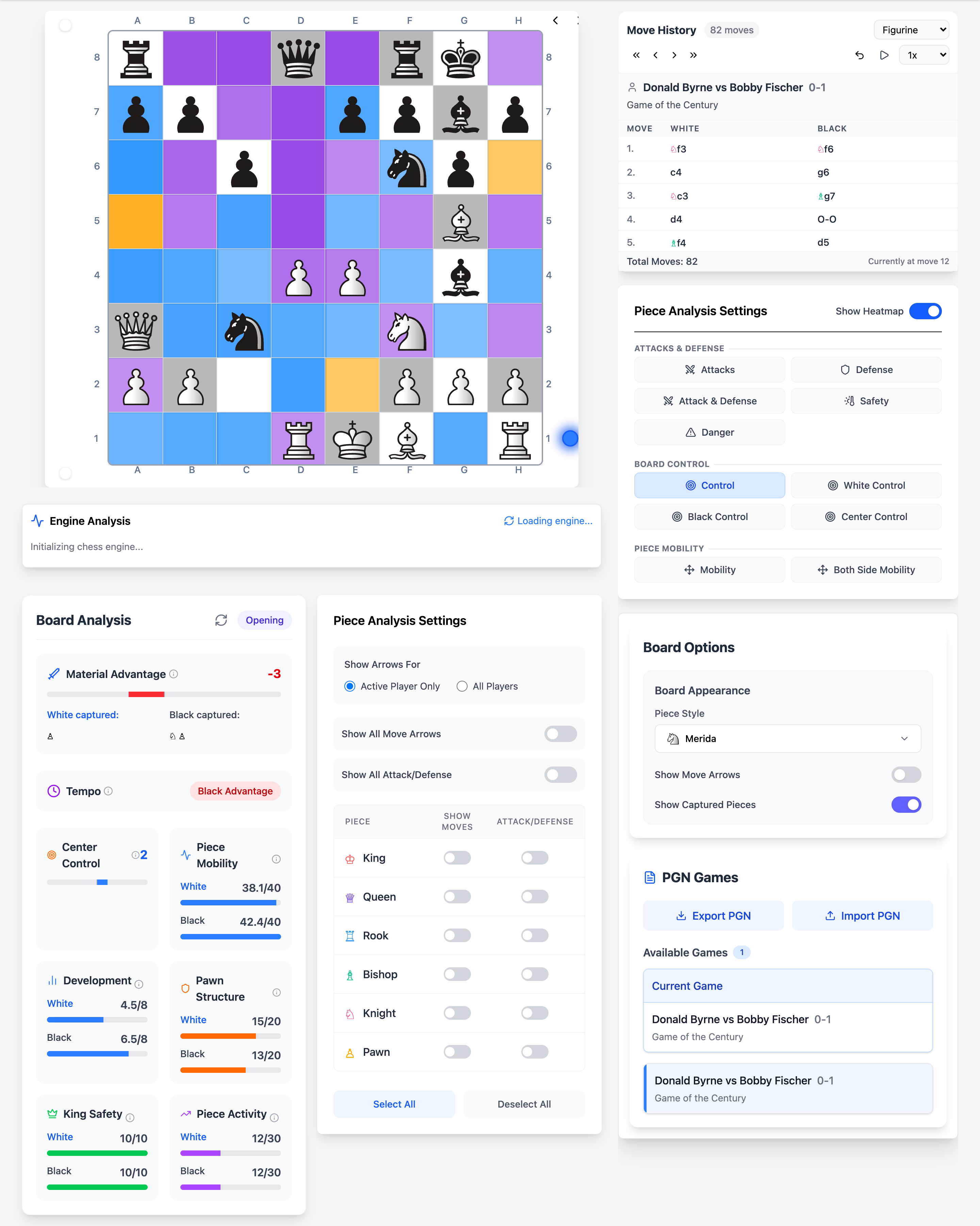
Numbers tell part of the story; patterns tell the rest. Chessyi offers 12+ heatmap overlays that colour the board by what is happening tactically and strategically, attacks, defense, mobility, king safety, tension, and more.
Toggle overlays while stepping through a game to see why a position suddenly feels sharp, or why one side lacks coordination. It is one of the most distinctive tools on the platform.
What you get
- 11 heatmap overlays across attacks, control, and mobility
- Updates live as you move pieces
- Combine with Stockfish eval for complete picture
- Ideal for teaching and self-study
- Works on any position including opening drills
How it works
Open heatmap panel
Select from the analysis sidebar heatmap options.
Choose overlay type
Switch between control, mobility, tension, and other views.
Play moves and compare
Watch colours shift as the position evolves.
11 overlay types
Every heatmap, explained
Toggle any overlay from the analysis sidebar while you review games, drill openings, or run Stockfish. Each layer answers a different question about the position.
Attacks & defense
Spot tactical tension instantly, hanging pieces, overloaded defenders, and king safety without calculating every line.
Attacks
Shows every square and piece under attack. Hanging pieces glow bright red; the king in check is highlighted at full intensity. Empty squares controlled by the opponent appear in orange so you see infiltration squares at a glance.
Colours: Red = under attack · Orange = empty square controlled by opponent
Defense
Highlights how well each piece is defended, weighted by the value of defending units, not just a piece count. Find solid anchors and pieces that only look safe.
Colours: Green intensity = defensive strength on that square
Attack & defense
A net-threat view: compares attack pressure against defense on each occupied square. Quickly see which pieces are over-defended, balanced, or sitting in real danger.
Colours: Red = net threat · Green = comfortably defended
Safety
Scores each piece as defense minus attack. Safe pieces read green; exposed pieces shift red. Ideal for teaching king safety and spotting loose material before tactics land.
Colours: Green = safe · Red = unsafe relative to attackers
Danger
Danger level scales with piece value and the attack-to-defense ratio, a queen under fire looks hotter than a pawn. Kings in check are flagged at maximum intensity.
Colours: Deeper red = higher danger, scaled by piece importance
Board control
See who dominates space on the board, overall, by colour, or focused on the critical centre squares.
Control
Weighted square control using piece values, not just counts. Blue squares favour White, purple favours Black, and orange marks contested territory where both sides exert pressure.
Colours: Blue = White · Purple = Black · Orange = contested
White control
Isolates squares attacked by White pieces. Central squares (d4, d5, e4, e5) are emphasised so you can read opening and middlegame space advantages instantly.
Colours: Blue intensity = White influence on the square
Black control
The mirror of White control, every square Black attacks, with extra weight on the centre. Compare with White control to see where the real battle for space is happening.
Colours: Purple intensity = Black influence on the square
Center control
Zooms into the central 16 squares (c3-f6). Shows who owns the middle of the board, the fight that usually decides whether your pieces coordinate or choke.
Colours: Blue / purple / orange for White, Black, or shared centre
Piece mobility
Measure how much each piece can actually move, active pieces versus cramped, passive units.
Mobility
Colours each piece by its legal move count relative to what is possible from that square. Spot cramped knights on the rim, free bishops on open diagonals, and rooks that still need an open file.
Colours: Brighter = more legal moves for that piece
Both-side mobility
Compares mobility across both armies on one overlay. See at a glance which side has more active pieces and where coordination breaks down, especially useful in closed positions.
Colours: Side-by-side mobility comparison across the position
Unique on Chessyi
- Heatmaps integrated with engine analysis, rare in free browser tools
- Multiple overlay types beyond simple attack maps
- No plugin or desktop app required
Frequently asked questions
Related features
Full-strength Stockfish analysis in your browser
Run Local Stockfish engine analysis in your browser on Chessyi. Eval bar, multi-PV lines, depth control, and best-move arrows, no install, instant feedback.
Attack arrows and defense markers per piece
Analyse individual piece activity on Chessyi. Toggle per-piece move arrows, attack and defense markers to see how each unit contributes to the position.
Material, structure, and king safety at a glance
Chessyi static analysis scores material balance, center control, mobility, pawn structure, king safety, development, and game phase, instant positional feedback without engine depth.
Ready to analyse like a master?
Open the board with a 7-day Pro trial. Stockfish, openings, and 1.9M games in one place.
Start 7-day free trial