Unique to Chessyi
See chess positions like never before
Most chess sites show an eval number. Chessyi paints the board, twelve heatmap overlays, per-piece attack and defense markers, and static position metrics on the same interactive board where Stockfish runs locally. Built for serious learners who want to understand why, not just what.
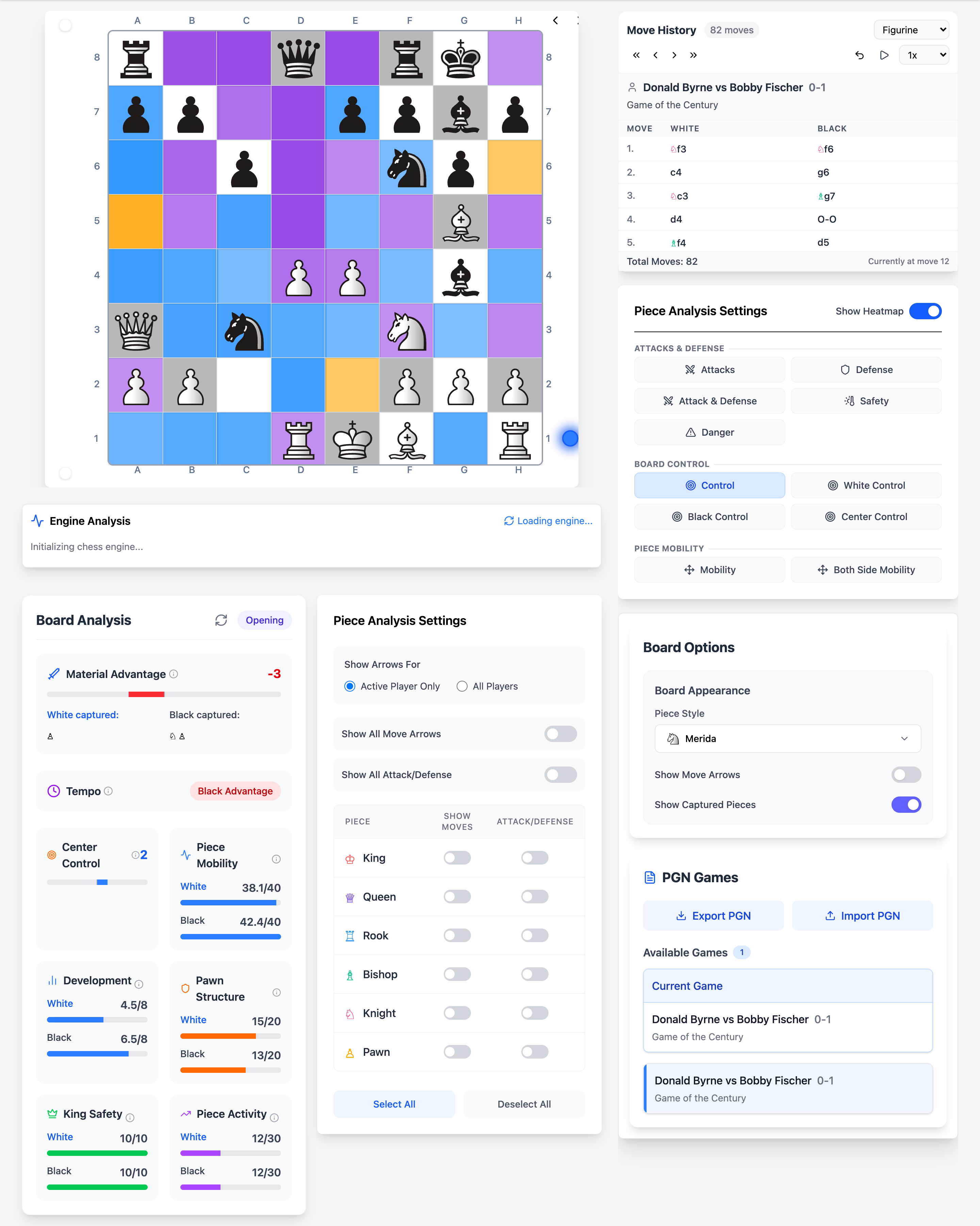
12+ visualization layers
Each overlay answers a different question. Toggle them in real time as you step through games or analyse your own positions.
Square control
Who dominates each square, white, black, or contested.
Mobility
How much freedom each side has to move pieces.
Both-side mobility
Combined mobility heatmap for sharp comparisons.
Attacks
Squares under direct attack, spot tactical tension instantly.
Defense
Protected squares and defensive resources.
Tension
Contested squares where pieces face off.
Danger zones
Areas where pieces are most vulnerable.
King safety
Shelter and exposure around each king.
Pawn structure
Weak squares, chains, and isolated pawns.
Piece activity
Active vs passive piece placement.
Center control
Fight for the critical central squares.
Static evaluation
Fast heuristics, material, space, and game phase without engine depth.
How visualization fits your study workflow
Heatmap overlays
Toggle between 12+ overlay types on the live board. Control, tension, mobility, king safety, and more, each answers a different question about the position.
Learn morePiece-level markers
Show attack and defense arrows per piece type. See which knight is dominating, which rook is passive, and how each unit contributes to the whole.
Learn moreStatic position analysis
Instant heuristics without waiting for engine depth, material balance, center control, pawn structure, and game phase at a glance.
Learn moreCombined with Stockfish
Visualization and engine analysis on the same board. Understand why Stockfish prefers a move by seeing the underlying square control and tension.
Learn moreWhy serious learners choose Chessyi
Only chess software with 12+ heatmaps on one board
Lichess and Chess.com show eval bars. Chessyi paints the position, control, tension, mobility, and king safety as colour overlays you toggle in real time.
Engine runs on your machine, not a queue
Local Stockfish executes locally in a Web Worker. No server wait, and your opening prep stays private.
Study desk + training gym in one app
Load a Carlsen game, step through with heatmaps, drill the same opening line, then spar the engine, without switching tabs or tools.
1.9M master games included
No separate database subscription. 141 GM collections, famous classics, and repertoire PGNs ship with the software.
Learn the visualization workflow
Guides that turn coloured squares into plans — then verify with Stockfish on the same board.
How to read chess heatmaps
Control, tension, mobility, and danger — what each overlay is for.
Best ways to visualize positions
Honest comparison of eval bars, GitHub tools, and integrated study software.
Heatmap feature deep dive
Every overlay type explained with colour meanings.
Analyze a Chess.com PGN
Export → import → heatmaps → local Stockfish workflow.
Visualization FAQ
What is a chess heatmap?
A chess heatmap colours the board by a positional signal — square control, attacks, mobility, king safety, and more — so you can see structure instead of only reading an eval number.
How is Chessyi different from an eval bar?
Eval bars summarise who is better. Chessyi’s 12+ overlays show why: contested squares, unsafe pieces, cramped mobility, and king exposure you can reread while calculating.
Can I use heatmaps with Stockfish at the same time?
Yes. Toggle overlays while local Stockfish runs on the same board. Visualize first, then verify candidate moves with multi-PV lines.
Experience deep visualization today
Open the board free, toggle heatmaps on any position in seconds.
Start 7-day free trial